OpenCode Guide
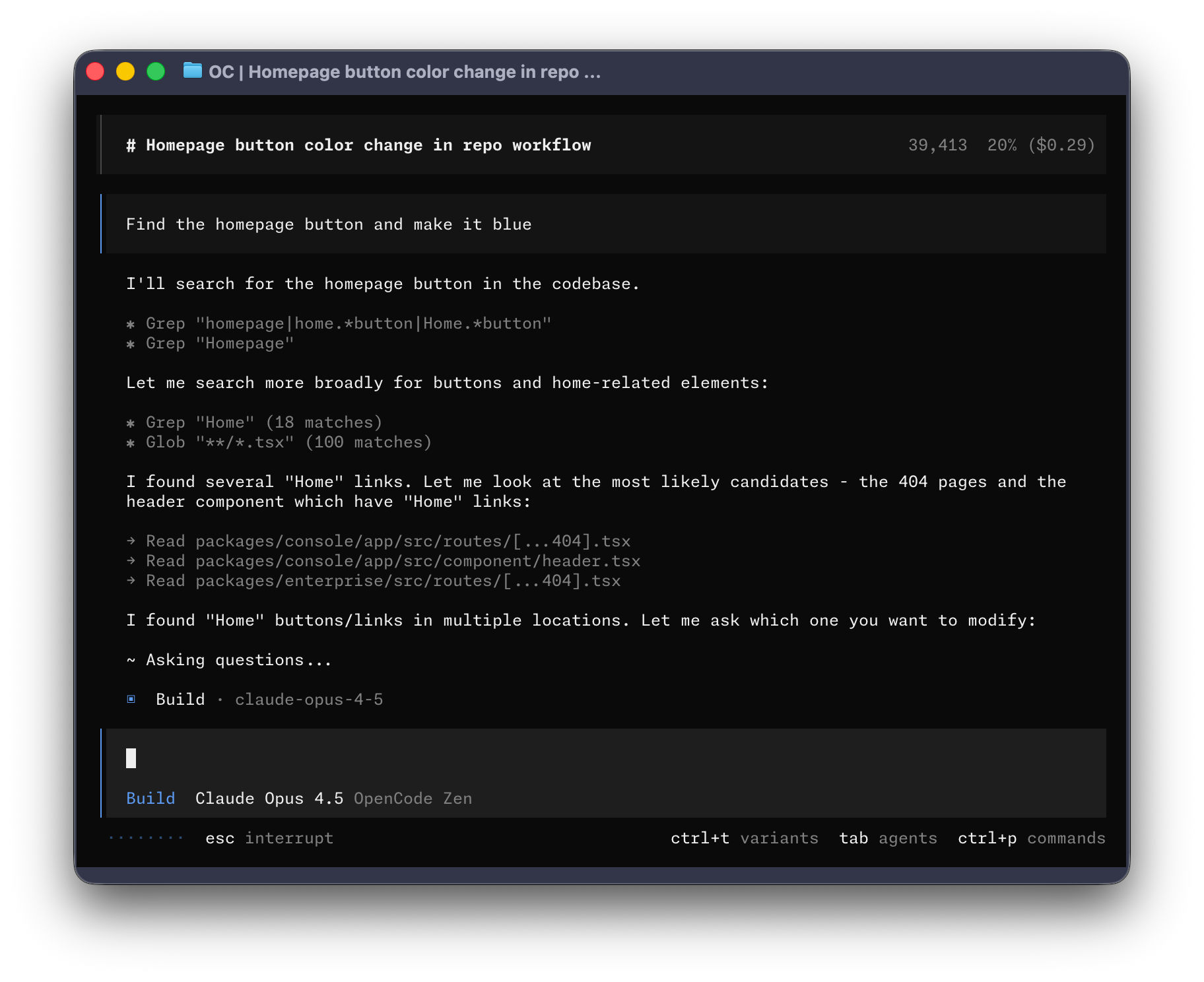
OpenCode is the kind of tool that becomes useful before it becomes interesting. Start with one repository and one repeatable task—understanding a module, fixing a failing test, or preparing a small refactor—then add providers, MCP servers, and plugins only when you can explain the problem each one solves. This guide covers the main surfaces and the decisions that matter when setting it up.
Table of Contents
- What is OpenCode?
- Official Links
- Installation
- Core Features
- Model Support
- Plugins & Extensions
- Most Used Plugins
- Configuration
- Interface Options
- Enterprise Features
- Use Cases
- Comparison
- Troubleshooting
- Further Reading
What is OpenCode?
OpenCode is an open-source AI coding agent that helps developers write, debug, refactor, and understand code. It is primarily terminal-oriented, with additional desktop and IDE surfaces that vary by release.
Project status
OpenCode is an actively developed open-source project. For current releases, supported features, and licensing details, use its official documentation and repository.
A useful mental model
OpenCode is a local client that coordinates a model provider, your repository, and optional tools. The client may run locally while the selected provider processes prompts or code remotely. Check the current provider terms and the project's privacy documentation rather than assuming that “local-first” means that no data leaves your machine.
Establish a baseline
Run OpenCode once with the default configuration, ask it to inspect a small task, and review the proposed plan before adding plugins or external tools.
Official Links
- Website
- GitHub repository
- Documentation
- Zen (curated models)
- Enterprise
- Discord community
- Desktop app
Installation
Prerequisites
Requirements Before You Start
- A modern terminal emulator (WezTerm, Alacritty, Ghostty, or Kitty recommended)
- API keys for your preferred LLM provider(s)
- Node.js 18+ (required for MCP servers and plugins)
Node.js Installation (Common "Foot Guns" to Avoid)
Common Mistakes to Avoid
| ❌ Don't Do This | ✅ Do This Instead |
|---|---|
sudo apt install nodejs (Ubuntu - installs ancient Node) |
Use mise, fnm, n, or nvm |
Rely on source ~/.nvm/nvm.sh manually |
Use mise or fnm (auto-loads) |
| Assume Node persists across terminals | Test in a NEW terminal |
| Use different Node versions per project | Use a version manager |
Recommended: mise (Best for OpenCode Users)
mise is a "tool runner" that manages Node, Python, Go, etc. - persistent and project-aware.
# Install mise (if you have curl or build from source)
curl https://mise.run | sh

# Add to shell config (~/.zshrc or ~/.bashrc):
echo 'eval "$(mise activate zsh)"' >> ~/.zshrc

# Install Node via mise
mise use -g node@lts

# Verify (open NEW terminal)
node --version
Distrobox Users
If you're using distrobox to develop in a different distribution, be aware that mise-installed packages (like Node.js tools via mise use -g node@lts) can sometimes conflict with packages installed in the host distribution's package manager. For example, tools installed globally via pipx on the host may not be accessible inside the container, or vice versa. This is because distrobox shares the host's home directory but uses the container's binary paths. If you encounter issues, consider whether you're running tools from the host or the container — consistency is key.
Alternative: fnm (Fast Node Manager)
# Install fnm
curl -fsSL https://fnm.vercel.app/install | bash

# Add to shell config:
echo 'source $(fnm env --shell-only)' >> ~/.zshrc

# Install LTS
fnm install --lts
fnm default lts-latest

# Verify (new terminal)
node --version
Alternative: pnpm + corepack
If you already use pnpm, enable corepack (comes with Node 18+):
# Enable corepack (enables pnpm without separate install)
corepack enable

# This gives you pnpm AND the right Node version for pnpm
pnpm --version
Quick Verification
How to Verify
- Open a BRAND NEW terminal (not the same one)
- Run:
node --version
npm --version
Both should show versions. If errors → Node not persistent.
Why This Matters for MCP
MCP servers run as subprocesses. If Node isn't persistent:
- MCP tools fail silently or hang
npxcommands don't work- Plugin loading fails
Install via Script (Recommended)
Quick Install (Recommended)
# Official install script (recommended)
curl -fsSL https://opencode.ai/install.sh | sh

# Alternative URL (also works)
curl -fsSL https://opencode.ai/install | bash
Package Managers
Using Node.js:
npm install -g opencode-ai   # npm
bun install -g opencode-ai   # bun
pnpm install -g opencode-ai  # pnpm
yarn global add opencode-ai  # yarn
Using Homebrew (macOS/Linux):
brew install anomalyco/tap/opencode
Using Arch Linux:
sudo pacman -S opencode           # Stable
paru -S opencode-bin              # AUR (Latest)
Windows Installation
Using Chocolatey:
choco install opencode
Using Scoop:
scoop install opencode
Using Docker:
docker run -it --rm ghcr.io/anomalyco/opencode
Using WSL (Recommended): OpenCode works best on Windows through WSL (Windows Subsystem for Linux).
Desktop App
Download the beta for macOS, Windows, and Linux:
Core Features
1. Terminal User Interface (TUI)
OpenCode's primary interface is a terminal-based UI with:
- Session management
- File browsing
- Real-time code editing
- Multi-session support
- Theme customization
2. Plan and Build Modes
Plan Mode (Tab key):
- Analyzes and explains code
- Creates implementation plans
- No code changes made
- Perfect for reviewing before building
Build Mode (Tab key):
- Executes code changes
- Makes file edits
- Runs tests and commands
3. LSP Integration
Auto-loads Language Server Protocol servers for:
- Real-time type checking
- Code navigation (Go to Definition, Find References)
- Refactoring tools
- Diagnostics
Supported Languages:
- TypeScript/JavaScript (tsserver)
- Python (Pyright, Pylsp)
- Rust (rust-analyzer)
- Go (gopls)
- And many more via custom LSP servers
4. Git Integration
GitHub Integration:
- Trigger via
/opencodecomments in issues and PRs - Execute in GitHub Actions runners
- Automatic commit messages
GitLab Integration:
- Merge request comments
- CI/CD integration
5. Share Sessions
Share conversation links with your team:
/share
Creates a link to the current conversation for collaboration and review.
6. Multi-Session
Run parallel agents on the same project:
- Multiple independent sessions
- Shared context when needed
- Share links for each session
7. Model Context Protocol (MCP)
Connect to MCP servers for extended capabilities:
- Database access
- External tools
- API integrations
- Browser automation
8. File Watching
Auto-reload and respond to file changes:
- Real-time updates
- Build on save
- Test on change
Model Support
Providers
OpenCode connects to virtually any LLM via Models.dev:
| Category | Providers |
|---|---|
| Cloud APIs | OpenAI, Anthropic, Google, Mistral, Cohere |
| Local Models | Ollama, LM Studio, LocalAI |
| Subscriptions | GitHub Copilot, ChatGPT Plus/Pro |
| Routers | OpenRouter, Models.dev |
| Open Models | Hugging Face and other open-model providers |
Hugging Face Integration
OpenCode supports Hugging Face Inference Providers, giving you access to open models through the providers currently listed by Hugging Face. Treat the provider's data handling, rate limits, and model availability as separate decisions from installing OpenCode.
Quick Setup
# 1. Create token at huggingface.co/settings/tokens
#    (needs "Make calls to Inference Providers" permission)

# 2. Run auth login
opencode auth login

# 3. Select Hugging Face when prompted
#    Enter your token: hf_...

# 4. Select a model
/models
Available Models
Access to open models from multiple providers:
- Llama variants
- Qwen
- Phi
- Mistral
- GLM
- And more...
Config (Optional)
For organization billing:
{
  "$schema": "https://opencode.ai/config.json",
  "provider": {
    "huggingface": {
      "options": {
        "headers": {
          "X-HF-Bill-To": "your-org-name"
        }
      }
    }
  }
}
Resources:
Choosing a model
Model names, availability, and quality change quickly. Instead of treating a static list as a recommendation, choose a model against the task: fast edits, long-context exploration, careful reasoning, or local/offline work. Compare the current options in Models.dev and the OpenCode provider documentation, then record the model and date when a project depends on a particular behavior.
OpenCode Zen
A curated list of tested and verified models:
- Benchmarked specifically for coding agents
- No performance downgrade or routing to cheaper models
- Provider billing and usage terms vary
- Team workspace management
Model availability and free tiers are provider-controlled and should be verified immediately before use.
Plugins & Extensions
Plugin System
OpenCode's plugin system allows hooking into various events and customizing behavior.
Loading Plugins
From local files:
.opencode/plugins/      # Project-level
~/.config/opencode/plugins/  # Global plugins
From npm:
{
  "plugin": ["opencode-helicone-session", "opencode-wakatime", "@my-org/custom-plugin"]
}
Plugin Events
OpenCode exposes lifecycle events for plugins, including:
| Category | Events |
|---|---|
| Command | command.executed |
| File | file.edited, file.watcher.updated |
| Session | session.created, session.compacted, session.deleted, session.diff, session.error, session.idle |
| Tool | tool.execute.before, tool.execute.after |
| LSP | lsp.client.diagnostics, lsp.updated |
| TUI | tui.prompt.append, tui.command.execute, tui.toast.show |
| Permission | permission.asked, permission.replied |
| Shell | shell.env |
| Server | server.connected |
| Todo | todo.updated |
| Installation | installation.updated |
Built-in Tools
| Tool | Description |
|---|---|
bash |
Execute shell commands |
read |
Read files with glob support |
edit |
Apply string replacements |
write |
Write content to files |
grep |
Search file contents |
glob |
Find files by pattern |
lsp |
Language server queries |
apply_patch |
Apply patches |
skill |
Load skill documentation |
todowrite |
Manage todo lists |
webfetch |
Fetch web content |
websearch |
Search the web |
question |
Ask user questions |
Custom Tools
Plugins can add custom tools via the tool helper:
import { tool } from "@opencode-ai/plugin";

export const MyTool = tool({
  name: "my_tool",
  description: "A custom tool",
  parameters: z.object({
    foo: z.string(),
  }),
  execute: async (args, ctx) => {
    return `Hello ${args.foo}`;
  },
});
Most Used Plugins
1. Oh My OpenCode
GitHub: https://github.com/code-yeongyu/oh-my-openagent
Orchestration layer with specialized agents, hooks, MCPs, and workflow automation.
Features:
- Planner-Sisyphus agent
- Automation hooks
- Pre-configured Context7 and grep.app MCPs
- LSP defaults
2. OpenCode Swarm
GitHub: https://github.com/zaxbysauce/opencode-swarm
Architect-centric agentic swarm with specialized agents.
Features:
- Hub-and-spoke orchestration
- Gated pipeline (code needs reviewer + test engineer approval)
- Specialized agents
- SAST and secrets scanning
- Multi-language support
- Free tier available
3. opencode-prompts
GitHub: https://github.com/minipuft/opencode-prompts
Chain tracking, gate reminders, and state preservation for prompt engineering.
Features:
- Gate enforcement
- Chain progress tracking
- State preservation
- Shell verify tracking
4. open-reload
GitHub: https://github.com/veemex/open-reload
Hot-reload MCP meta-plugin for development.
Features:
- Live tool updates without restart
- Plugin development workflow
- Context threading
5. opencode-mcp
GitHub: https://github.com/AlaeddineMessadi/opencode-mcp
MCP server bridging OpenCode to other AI tools.
Features:
- 79 tools
- Multi-project support
- Auto-start capability
6. opencode-ecc (Everything Claude Code)
GitHub: https://github.com/affaan-m/everything-claude-code
Complete Claude Code compatibility for OpenCode.
Features:
- Specialized agents
- 24 commands
- 16 skills
- Hook system parity
7. Session & Analytics Plugins
| Plugin | Purpose |
|---|---|
opencode-helicone-session |
Session logging and analytics |
opencode-wakatime |
Automatic time tracking |
8. MCP Servers
| Category | Popular Servers |
|---|---|
| Browser | Playwright, Puppeteer |
| Database | PostgreSQL, Supabase, SQLite |
| Search | Brave Search, Google Search |
| Communication | Slack, Discord, Linear, Notion |
| Cloud | AWS, GCP, Azure |
| Development | GitHub, GitLab, Docker |
| Memory | Memory (context persistence) |
Resources:
- https://github.com/modelcontextprotocol/servers
- https://github.com/wong2/awesome-mcp-servers
- https://mcp-awesome.com
Configuration
Configuration Files
| Location | Priority | Purpose |
|---|---|---|
./opencode.json |
1st | Project directory |
~/.config/opencode/opencode.json |
2nd | XDG config directory |
~/.opencode.json |
3rd | Home directory |
Note: Config file locations (verified 2026):
$HOME/.opencode.json$XDG_CONFIG_HOME/opencode/.opencode.json./.opencode.json(local directory)
Basic Configuration
{
  "$schema": "https://opencode.ai/config.json",
  "model": "anthropic/claude-sonnet-4-20250514",
  "permission": {
    "bash": "allow",
    "read": "allow",
    "edit": "allow"
  }
}
Advanced Configuration
{
  "$schema": "https://opencode.ai/config.json",
  "model": "opencode/gpt-5.1-codex",
  "provider": {
    "openai": {
      "models": {
        "gpt-5": {
          "options": {
            "reasoningEffort": "high",
            "textVerbosity": "low",
          },
        },
      },
    },
  },
  "plugin": ["oh-my-openagent"],
  "mcp": {
    "enabled": true,
  },
  "permission": {
    "bash": "allow",
    "mcp_*": "ask",
  },
}
Provider Setup
Connect to providers using the /connect command:
/opencode
/connect
Then:
- Sign in to your provider
- Add billing details
- Copy API key
- Paste into terminal
Interface Options
1. Terminal (TUI)
The primary interface with full features:
- Interactive chat
- Session management
- File editing
- Real-time output
2. Desktop App
Beta available for:
- macOS
- Windows
- Linux
Download: https://opencode.ai/download
3. IDE Extensions
Available for:
- VS Code
- Cursor
- Zed
- Windsurf
- VSCodium
4. Web Interface
Access via browser at:
5. ACP (Agent Coding Protocol)
Connect to ACP-compatible editors for deep IDE integration.
Enterprise Features
Data and deployment questions
OpenCode can run locally and supports bring-your-own-key configurations, but privacy depends on the model provider, enabled integrations, and deployment mode. Review the current privacy and security documentation before sending sensitive code or connecting external systems. Do not promise that data never leaves your environment unless your complete setup actually enforces that boundary.
Enterprise Deployment
| Feature | Description |
|---|---|
| Self-Hosted | Run entirely on your infrastructure |
| Custom Providers | Use your own LLM infrastructure |
| Privacy Controls | Depends on provider, configuration, and deployment |
| SSO Support | Enterprise authentication |
Zen for Teams
- Invite teammates
- Assign roles (Admin, Member)
- Curate model access
- Monthly spending limits
- Shared API keys
Use Cases
OpenCode serves different types of users, from developers to non-programmers.
Developer Use Cases
Code Review and Analysis
# Review code for security issues
opencode run "Review src/auth.ts for security issues"

# Analyze code architecture
opencode run "Explain the architecture of the middleware system"

# Find all TODO comments in the project
opencode run "Find all TODO comments and create a summary"
Scaffolding New Features
# Initialize repository context first
opencode init

# Then scaffold a new feature with handler, validation, and tests
opencode run "Add a new POST /api/widgets endpoint with handler, validation, and tests"
Large-Scale Refactoring
# Rename a function across all files
opencode run "Rename getUserProfile to fetchUserProfile and update all imports and docs"
Test-Driven Development (TDD)
# Create failing test first, then implement
opencode run "Run npm test. Read the failure. Implement the code in feature.ts to make the test pass"
Debugging
# Find and fix bugs
opencode run "Find and fix the memory leak in the application"

# Explain error messages
opencode run "Explain what this error means in context of our codebase"
Documentation Maintenance
# Update outdated documentation
opencode run "Read all exported functions in src/api. Update docs/API.md to match the current signatures"
Language Migration
# Convert React class components to hooks
opencode run "Read Component.jsx. Rewrite it as a Functional Component using Hooks"
Average User Use Cases (Non-Developers)
Content Creation and Marketing
# White papers, LinkedIn posts, video scripts
opencode run "Write a white paper on [topic] using the style guide in docs/writing-style.md"

# Social media content
opencode run "Create 5 tweet thread concepts for [product launch]"
Translation Work
# Translate documents
opencode run "Translate the content in jp/ folder to English following the style in TRANSLATION_NOTES.md"
Data Analysis and Reporting
# Analyze data and generate reports
opencode run "Analyze parcel data in data/ and generate summary report with trends"
File Organization
# Organize downloads folder
opencode run "Organize the downloads folder: put movies in Movies/, TV shows in TV/"
Excel and Spreadsheet Work
# Generate formulas
opencode run "Create a formula in column D that calculates the sum of columns A and B"
Common Real-World Examples
Legacy Code Refactoring
opencode start "Take main.py. Split the database logic into db.py and the utils into utils.py"
CI/CD Automated Code Review
# .github/workflows/opencode-review.yml
name: opencode-review
on: [pull_request]
jobs:
  opencode:
    runs-on: ubuntu-latest
    steps:
      - uses: actions/checkout@v7
      - name: Run OpenCode
        # OpenCode v1.18.30; pin the action to the release commit.
        uses: anomalyco/opencode/github@3104c1428ec91f809e5ab86631300de41eb6952e
        with:
          model: anthropic/claude-sonnet-4-20250514
          prompt: "Code review for the PR changes"
GitHub Issue Triage
# In a GitHub issue comment
/opencode explain this issue

# In a GitHub PR comment
/opencode fix this
Database Operations via MCP
# Connect to database via MCP
opencode run "Show me the schema for the 'users' table"
Slack Bot Integration
Connect OpenCode to Slack for team questions like:
- "Where is the retry logic for payment processing?"
- "Summarize what changed in the last sprint"
Workflow Patterns
Plan/Build Pattern (Recommended)
- Start in Plan mode (
Tabkey) to outline approach - Review and refine the plan
- Switch to Build mode to implement
Agent Mode (Autonomous)
opencode --agent
Best for: Project setup, large refactors, debugging, testing, code migration.
Comparison
OpenCode vs Claude Code
| Feature | OpenCode | Claude Code |
|---|---|---|
| License | MIT | Proprietary |
| Plugin System | Event-driven plugins | 3 phases |
| Interface | TUI, Desktop, IDE | CLI only |
OpenCode vs Cursor
| Feature | OpenCode | Cursor |
|---|---|---|
| Focus | Terminal-native | IDE-centric |
| Model Support | Any provider | Custom models |
| Open Source | Yes | Partial |
When to Use OpenCode
- You want full control over your models
- You prefer terminal-based workflows
- You need cross-platform consistency
- You value open-source software
- You want to avoid vendor lock-in
Troubleshooting
Installation Issues
Verify installation:
opencode --version
Update OpenCode:
# Re-run install script
curl -fsSL https://opencode.ai/install | bash
Configuration Issues
Check config syntax:
# Config locations checked in priority order:
cat ~/.opencode.json                    # Home directory
cat ~/.config/opencode/opencode.json  # XDG config directory
cat ./opencode.json                # Project directory
Validate JSON:
# Use jq to validate any location
cat ~/.opencode.json | jq .
Provider Issues
Check API key:
/opencode
/connect
Test connection:
/opencode
/model <model-name>
Plugin Issues
Verify plugin loading:
opencode --version
# Should list loaded plugins
Debug mode:
opencode --debug
Performance Issues
Clear cache:
rm -rf ~/.cache/opencode
Check logs:
# Default log location
~/.config/opencode/logs/
Further Reading
Official Documentation
Model Resources
Community Resources
Plugin Resources
Comparisons
Research & Reviews
Guide last reviewed: September 2026. Installation commands, model names, provider availability, and plugin behavior are release-dependent; verify them against the linked upstream documentation before use.